Where Do WordPress Form Submissions Go? (And What Happens When Email Fails)
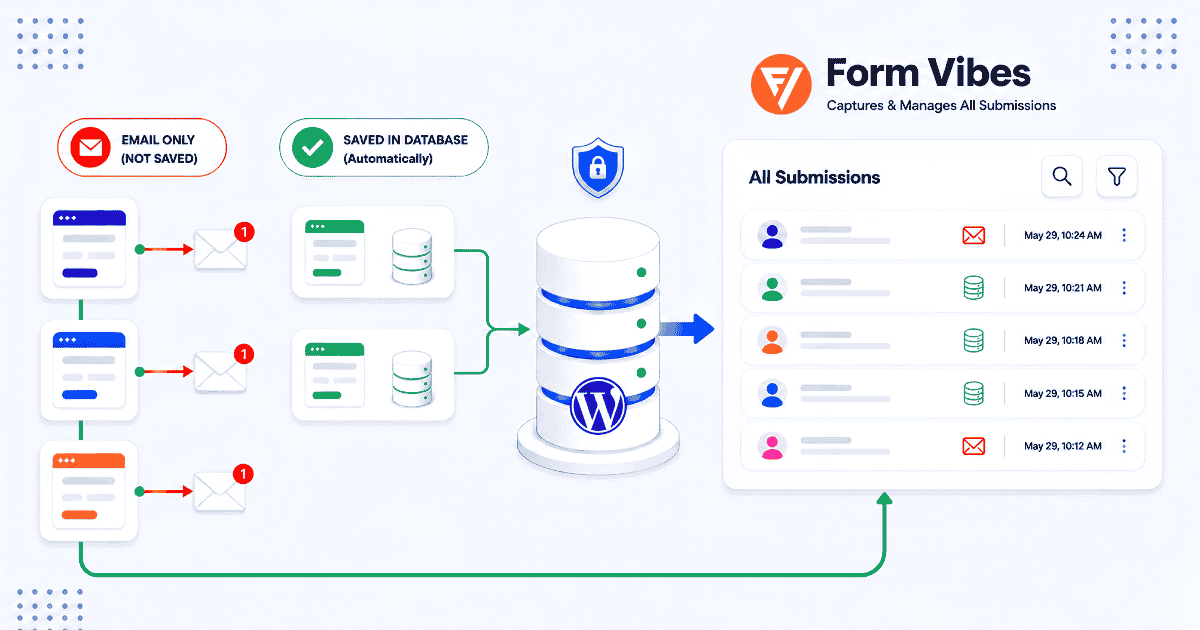
Someone filled out your contact form. You never got the email. Now you are wondering did they actually submit it, or did something go wrong on their end?
Almost certainly they submitted it. Whether you can still access that entry depends entirely on one thing which form plugin you are using.
Here is the answer before anything else. Find your plugin below and act immediately.
- Gravity Forms / WPForms Pro / Ninja Forms / Everest Forms: Your submission is saved. Go to your plugin’s entries screen and look for it right now. Details in the section below.
- WS Form / Elementor Pro Forms / Bricks Builder: It only save submissions if the Save action was configured earlier. You can check the plugin’s native entries screen, or use Form Vibes to automatically capture and store all submissions in one place.
- Contact Form 7 / Beaver Builder / WPForms Lite: They do not save form submissions in the database by default. If an email notification fails, the submission can be lost permanently. Using Form Vibes helps capture and store every submission safely inside your WordPress database.
Just found out your plugin does not save submissions? Install Form Vibes free and every entry is saved to your WordPress database from the next submission onwards – no configuration per form required.
Why your form plugin determines everything
WordPress has no built-in submission storage. There is no central entries screen in WordPress core. What happens to your submissions depends entirely on which plugin you installed.
Plugins handle this in two ways. Some write every submission to your WordPress database the moment someone hits Submit then send you an email notification. Others only send the email. If the email fails on a database-storing plugin, the data is already safe. If it fails on an email-only plugin, the submission is gone permanently.
Which plugins store submissions and where to find them?
Stores automatically – no setup needed
These plugins write every submission directly to your WordPress database the moment the form is submitted. No configuration required.
Gravity Forms Go to Forms > Entries in your WordPress admin. Every submission is there, searchable and filterable.
WPForms Pro Go to WPForms > Entries. All paid plans include automatic storage. WPForms Lite does not store submissions – if you are on the free version, see the email-only section below.
Ninja Forms Go to Ninja Forms > Submissions. Storage is included on the free tier with no extra setup.
Everest Forms Go to Everest Forms > Entries. Storage is included and automatic on all plans.
Tips: If your plugin is in this list and you still cannot find the submission, check your search and date filters. Most native entry screens default to showing recent entries only – older submissions may need a date range adjustment to surface.
Stores submissions – but only if configured per form
These plugins have native submission storage but it is not automatic. The Save action must be added to each individual form before submissions are recorded.
WS Form Go to WS Form > Entries. WS Form requires the Save action to be added to each form inside the form’s Actions tab. If that action was not added when the form was built, the entries screen will be empty for that form.
Elementor Pro Forms Go to Elementor > Submissions. Elementor Pro has a Save to Database action that must be added to each form under Actions After Submit in the Elementor form widget. If that action was not configured, Elementor Pro has no record of that submission.
Bricks Builder Go to Bricks > Form Submissions. Bricks introduced a Save Submission action in version 1.9.2. It must be added per form manually. Forms built before version 1.9.2 or without this action are effectively email-only in Bricks’ own panel.
Notes: If Form Vibes was installed on your site, it captured submissions automatically regardless of whether the native Save action was configured.
Email-only – no native storage exists
These plugins send submissions as an email notification only. Nothing is written to your WordPress database unless Form Vibes is installed.
Contact Form 7 Over 10 million active installations and email-only by default. There is no entries screen, no database record, and no recovery if the email failed and Form Vibes was not installed.
Beaver Builder contact form The Contact Form module in Beaver Builder has no native entry storage. The submission went out as an email and nowhere else.
WPForms Lite The free version of WPForms does not store submissions. If you had the optional cloud backup feature enabled, check there. Otherwise, the submission is gone.
Important: Many CF7 users install Flamingo to save submissions — but Form Vibes does everything Flamingo does and a lot more. See the full comparison.
How to make sure this never happens again
The site looks completely normal throughout all of this. No error in WordPress. No alert. No log entry. The visitor gets a success message. You get nothing.
Install Form Vibes
Form Vibes captures and stores every form submission directly in your WordPress database, so you do not lose leads even if email notifications fail. It works with popular form plugins and gives you a centralized dashboard to manage, filter, and track all submissions easily.
What you get on the free plan
- Every submission saved to your database – before email sends
- Unified dashboard for all 9 supported form builders in one place
- Submission trend analytics – daily, weekly, monthly
- Date range filtering and full-text search
- Basic CSV export
What Form Vibes Pro adds
- Unlimited CSV export with field-level selection
- Export Profiles – saved export configurations, one-click re-run
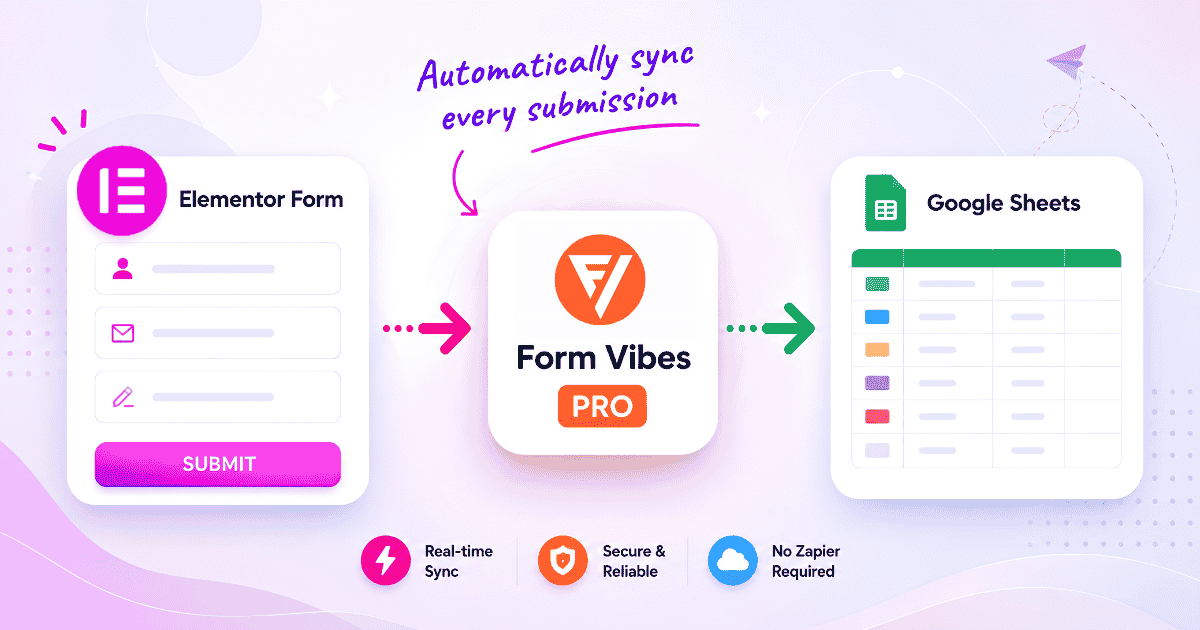
- Google Sheets sync – real time, no Zapier
- Entry editing with full audit log
- Notes per submission
- Role Manager – client and team access control
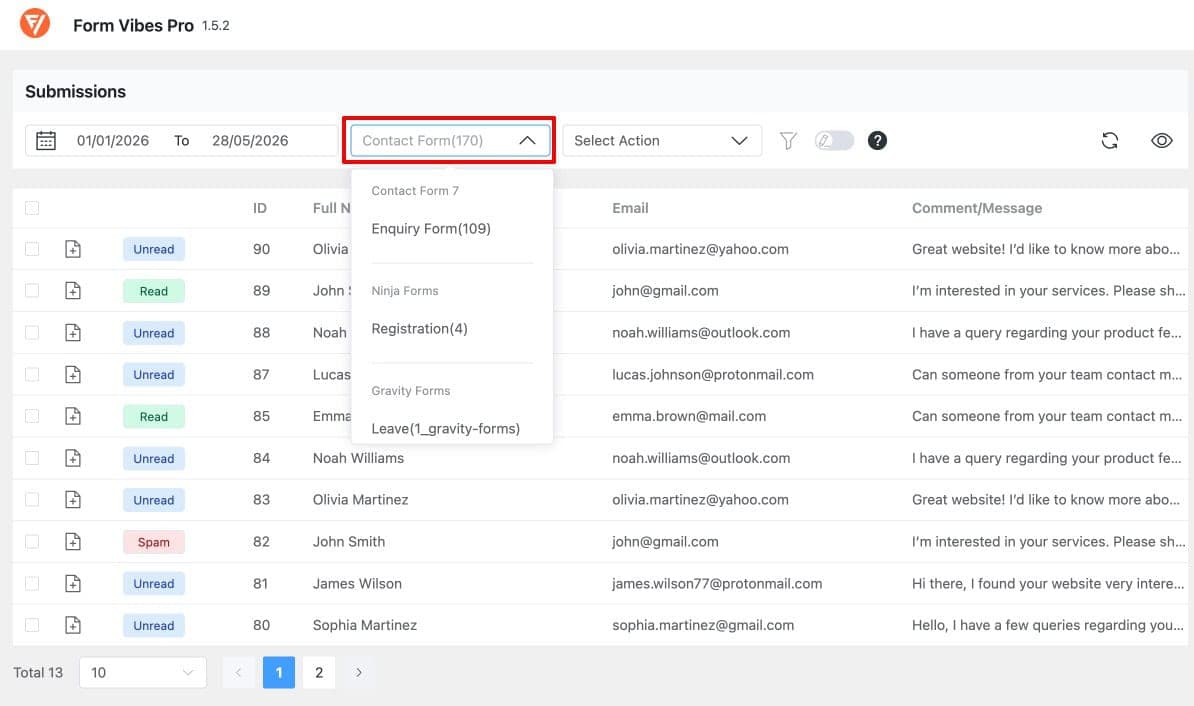
Notes: Running Gravity Forms for your main contact form and Contact Form 7 for a secondary enquiry form? You have to check two completely separate dashboards. There is no combined view without a third-party tool.
Conclusion
Whether your plugin saves submissions automatically or not, the safe setup is the same. Form Vibes sits alongside your existing form plugin and makes sure nothing is ever lost. It works whether you use Contact Form 7, Gravity Forms, Elementor Pro Forms, or any of the other 9 supported builders.
Install Form Vibes free, enable your form builder in Settings, and every submission from that point forward is protected. No configuration per form. No ongoing maintenance.

Never lose a form submission again
Form Vibes saves every submission to your WordPress database the moment someone hits Submit before the email even tries to send. Works with 9 form builders. Free to install.
Frequently Asked Questions
Common questions about saving form submissions in WordPress.
Does WordPress save form submissions by default?
No. WordPress has no built-in form submission storage. Whether submissions are saved depends entirely on the form plugin you are using. Gravity Forms, WPForms Pro, Ninja Forms, and Everest Forms store submissions automatically. Contact Form 7, Beaver Builder, and WPForms Lite are email-only and store nothing without a companion plugin.
Where do Contact Form 7 submissions go?
Contact Form 7 sends every submission as an email notification and stores nothing in your WordPress database by default. There is no entries screen and no recovery option if the email fails. To save CF7 submissions going forward, install Form Vibes free, it activates immediately and captures every submission from that point on.
What happens to form submissions when email fails?
It depends on your form plugin. If your plugin stores submissions natively such as Gravity Forms or WPForms Pro the data is already in your database and email failure changes nothing. If your plugin is email-only the submission is permanently gone with no way to recover it.
Does Form Vibes capture submissions even if the plugin’s own Save action was not configured?
Yes. Form Vibes hooks into the submission event directly before the plugin’s own Save action runs. This means it captures data from forms regardless of whether the Save action was configured. Even if those forms show nothing in their native entries screens, the data is in Form Vibes.
Can I recover a submission that was already lost?
If your plugin stores submissions natively and the entry is in the database, yes go to the plugin’s entries screen and search for it. If your plugin is email-only and the email never arrived, no – there is no database record to recover from. Installing Form Vibes now protects every submission going forward but cannot retrieve ones that were lost before it was active.




Leave a Reply