How to Save and Manage Elementor Form Submissions in WordPress

Elementor Pro already stores form submissions. If you have Elementor Pro active on your site, every form entry goes into a submissions panel and stays there. That part works.
The problem is everything that happens after storage. No analytics. No audit trail. No way to edit a submission that came in with a typo. No workflow for marking entries as reviewed or flagging them as spam. And if you run any other form plugin alongside Elementor, those submissions live somewhere else entirely.
Form Vibes fills every one of those gaps. Install it alongside Elementor Pro and your Elementor form data goes from stored to genuinely manageable with filtering, exports, trend analytics, an Event Log, and a unified dashboard for every form plugin on your site.
Before You Start
Elementor Pro installed and active – the Form widget is a Pro-only feature
At least one Elementor Form widget published on a page
Admin access to your WordPress dashboard
Form Vibes free – install in the setup steps below
What Is Missing from Elementor’s Built-in Submission Manager?
Elementor Pro’s submissions panel was built for entry storage and basic review, not for ongoing submission management. These are the specific gaps, with no padding:
No analytics. The submissions panel lists entries. It does not show you how many submissions came in this week versus last week, whether a form’s conversion rate is trending up or down, or which of your forms is generating the most leads. There are no charts, no daily breakdowns, and no trend data of any kind.
No Event Log. If a team member edits a submission in Elementor’s panel, there is no record of it. No timestamp, no who-did-what, nothing. For any site with more than one person touching submission data, this is a real accountability gap.
No way to edit a submission after it is saved. Once an entry lands in Elementor’s submissions panel, the field values are locked. If a client submitted their email address with a typo, or a phone number is in the wrong format for your CRM export, you cannot correct it. You would have to delete the entry and ask for a resubmission.
No submission status workflow. There is no way to mark an entry as Read, Unread, or Spam inside Elementor’s panel and no way to filter by any of those states. If you are reviewing 50 entries a week, there is no way to track what you have already handled.
No submission notes. You cannot add an internal comment to an Elementor entry. No “followed up by email”, no “client confirmed booking”, no team-facing annotation of any kind stays with the record.
Only works for Elementor forms. If your site runs Contact Form 7, WPForms, Gravity Forms, or any other form plugin alongside Elementor, those submissions are managed in completely separate places. There is no unified view.
Key Takeaway:
If you’re already using Elementor forms to capture submissions, Form Vibes can help you manage, track, and organize all your form entries more efficiently, without making any changes to your existing forms.
Why Use Form Vibes for Elementor Forms?
Form Vibes is a WordPress plugin that captures form submissions automatically and stores them in the WordPress database. It works with Elementor Forms and several other supported form builders, so it can also be useful if you manage more than one type of form on your site.
What Form Vibes does
Form Vibes helps you:
- save Elementor form submissions automatically
- view entries in a structured dashboard
- filter submissions when needed
- export entries for reporting or backups
- track submission trends with analytics
This makes it easier to manage form data without relying only on email notifications.
How Do You Save Elementor Form Submissions with Form Vibes?
Saving Elementor form submissions with Form Vibes is simple because the plugin starts capturing supported submissions automatically after installation.
1
Install & Activate Form Vibes
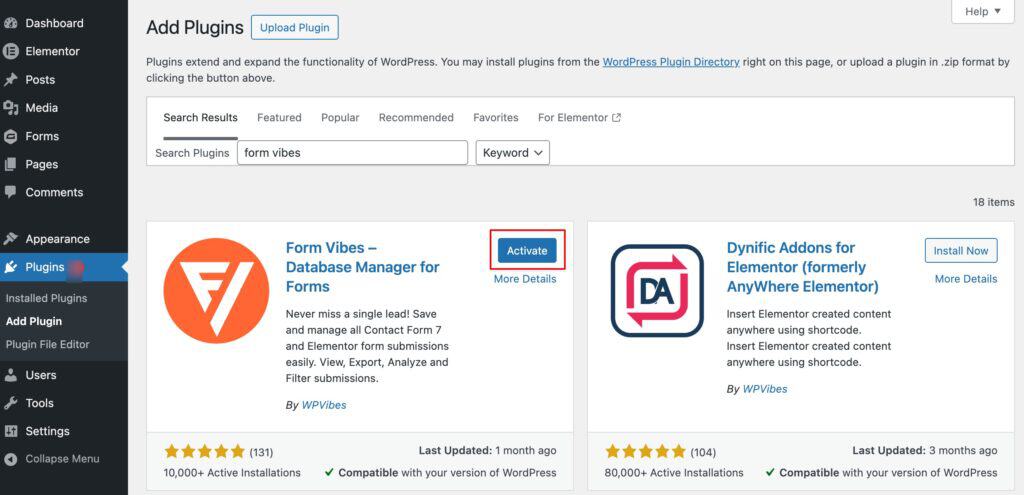
Go to Plugins > Add New in your WordPress admin. Search for “Form Vibes“, click Install Now, then Activate. Form Vibes is free from the WordPress plugin directory, no licence key, no account, no setup wizard.
2
Create or Use an Existing Elementor Form
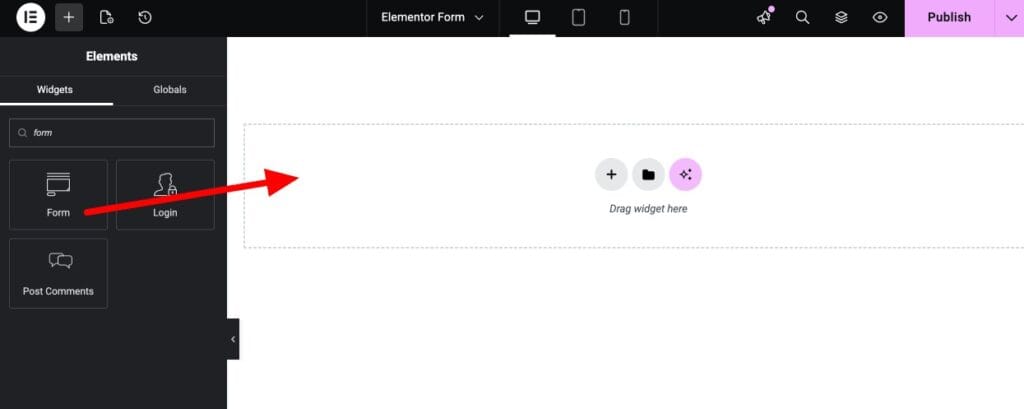
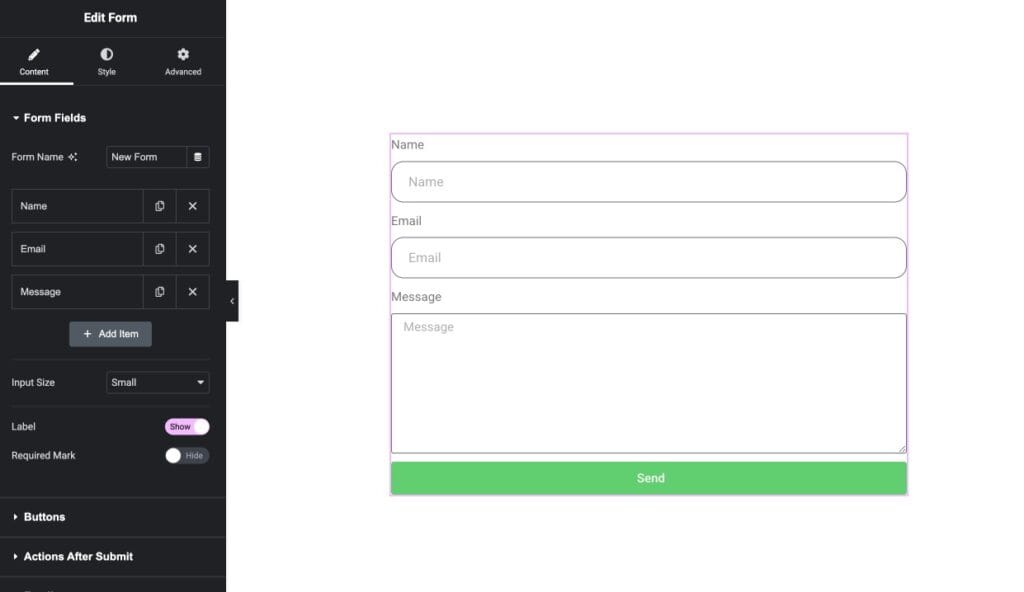
Open any page in the Elementor editor and add the Form widget from the Elementor Pro widget panel. Configure your fields and publish the page.
If you already have Elementor forms live on your site, no changes are needed, Form Vibes captures submissions from all existing Elementor forms automatically once it is active.
New to building Elementor forms? See the guide on how to configure an Elementor form to capture leads.
3
Submit a Test Entry
Open the page containing your Elementor form on the frontend and submit a test entry with your own details. This confirms the form is firing correctly and gives you something to verify in Form Vibes immediately.
4
View the Submission in Form Vibes
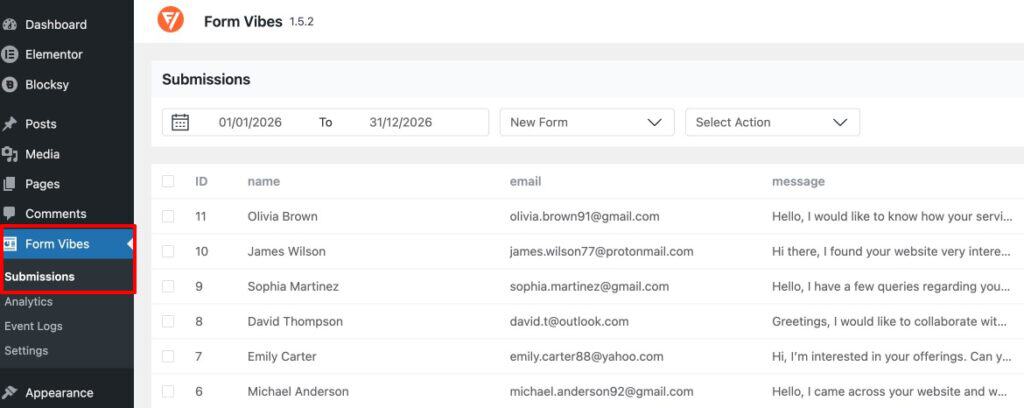
Go to Form Vibes > Submissions in your WordPress admin. Click the form dropdown at the top of the page and select your Elementor form. Your test entry appears in the table. Every future submission to that form is now captured and stored automatically in Form Vibes.
Important: The Form widget is an Elementor Pro feature. Form Vibes captures submissions from the Elementor Forms widget specifically. The free version of Elementor does not include the Form widget.
Form Vibes is free. Install it alongside Elementor Pro, submit one test entry, and every future Elementor submission is captured automatically, no changes to your forms needed.
How Do You View and Filter Elementor Submissions in Form Vibes?
All captured Elementor submissions are at Form Vibes > Submissions. Select your Elementor form from the dropdown at the top and every stored entry appears in a structured table.
The table is customisable without touching your Elementor forms. Show or hide specific field columns, drag-and-drop to reorder them, and rename column labels to match your own terminology. If a field is labelled “message” in the Elementor form but you want it displayed as “Enquiry Detail” in Form Vibes, you can do that. The rows-per-page setting is also adjustable. The table auto-refreshes at a configurable interval so new submissions appear without a manual page reload.
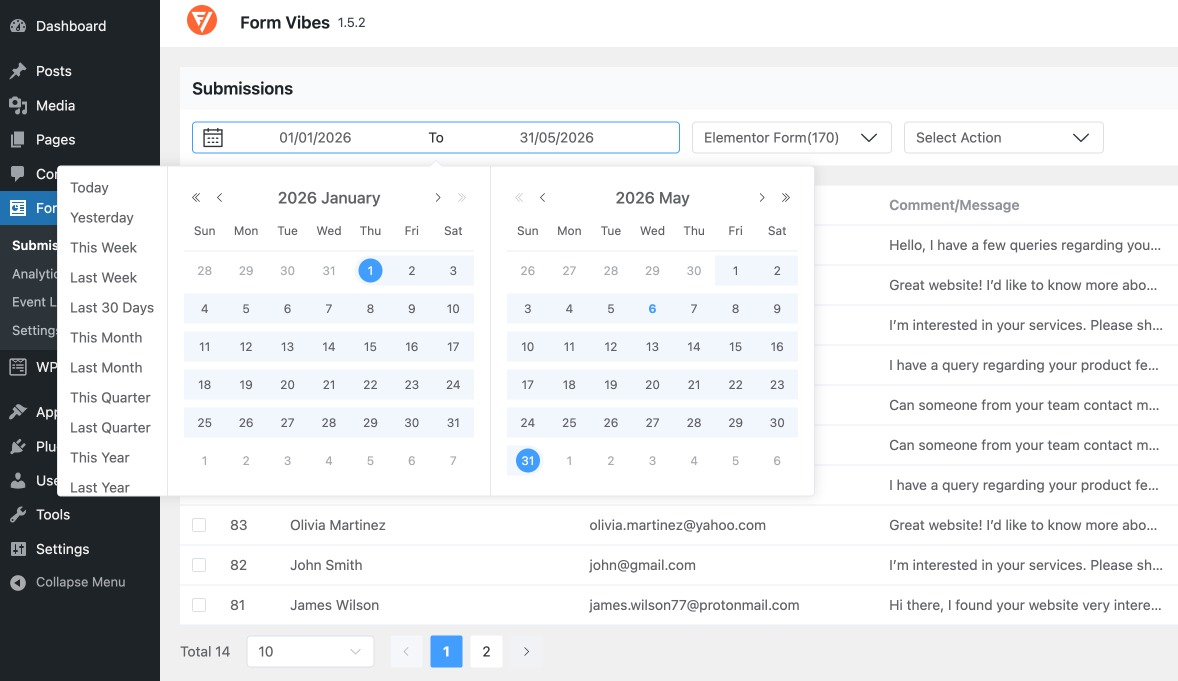
To narrow entries by time period, use the date range filter. Preset options cover Today, Last Week, Last Month, and Last Quarter. A custom date picker is available when you need a specific window. All your filter and display selections persist between sessions, the table opens to the same view every time you come back.
Form Vibes includes filtering options that help you find the entries you need. You can filter submissions using date range presets, custom date ranges, and field-based conditions.
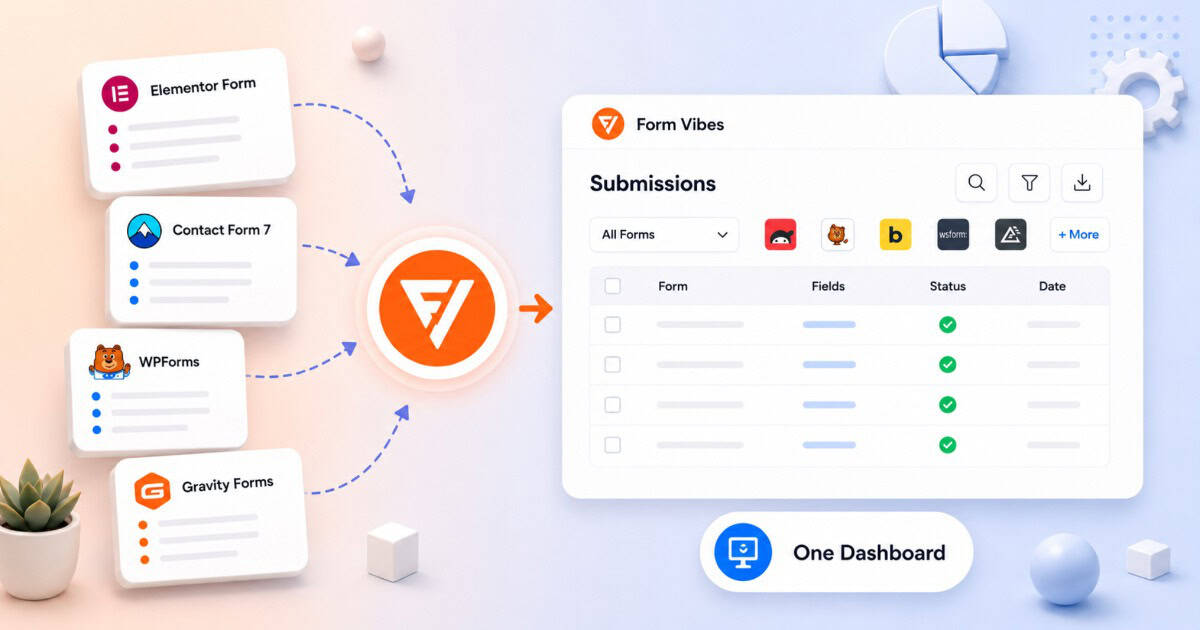
Pro: If your site runs Elementor forms alongside Contact Form 7, WPForms, Gravity Forms, or any other supported plugin, all submissions appear in the same Form Vibes dashboard. Switch between forms using the form dropdown, one login, one interface, every form on your site.
How Does the Form Vibes Event Log Work for Elementor Submissions?
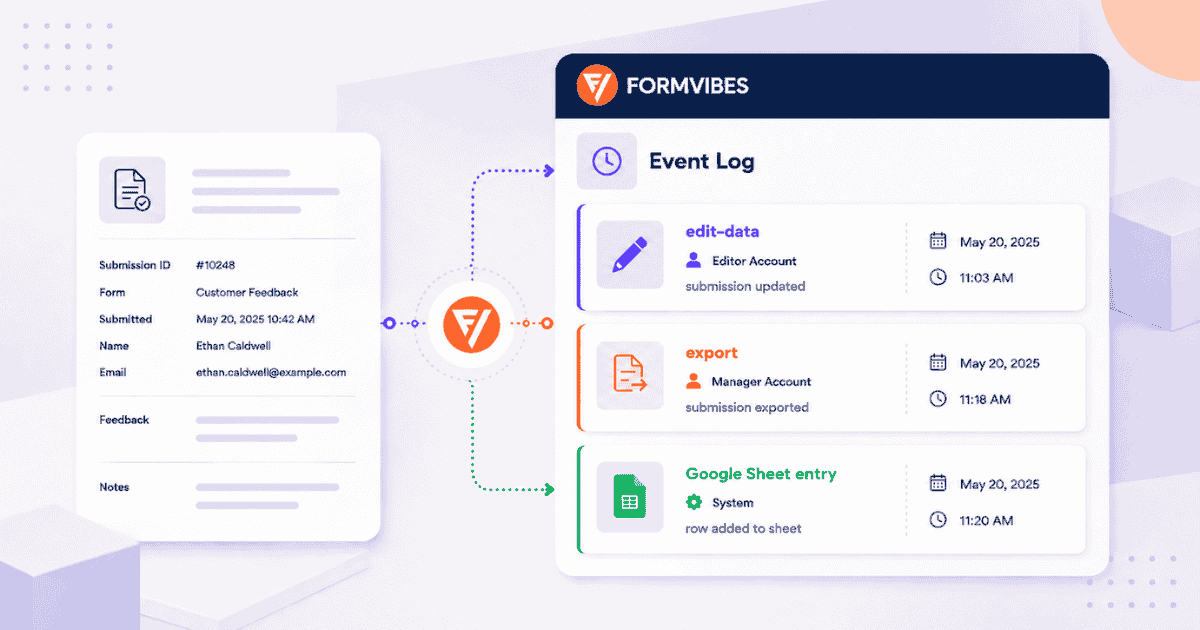
The Event Log is a free Form Vibes feature that records activity performed on your submissions after they are captured. It provides a history of actions taken on each entry, something Elementor’s native submissions panel does not offer.
In the free version, Form Vibes logs actions such as Quick CSV exports and records when they happened. Each log entry includes a timestamp and is attached to the individual submission record.
Form Vibes Pro extends the Event Log further by tracking submission edits, Google Sheets sync activity, and exports performed through Export Profiles. When a submission is edited, the log can also show both the previous and updated field values, making it easy to see exactly what changed.
This is especially useful when multiple people are managing Elementor submissions. The Event Log provides a clear history of who performed an action and when it happened, helping teams maintain accountability and track changes over time.

Key Takeaway:
The Event Log is available in the free version of Form Vibes and starts recording automatically from the moment it is activated, no configuration required. No equivalent exists in Elementor’s native submissions panel.
How Do You Edit an Elementor Form Submission After It Is Saved?
Elementor’s native submissions panel does not allow editing. Once an entry is saved, the field values are locked. Form Vibes Pro adds inline editing directly in the submissions table.
To edit a submission, open Form Vibes > Submissions, find the entry, and click the edit icon for the relevant row. The row becomes editable inline, click into any field cell, change the value, and save. No separate edit page, no modal, no form to fill in separately.
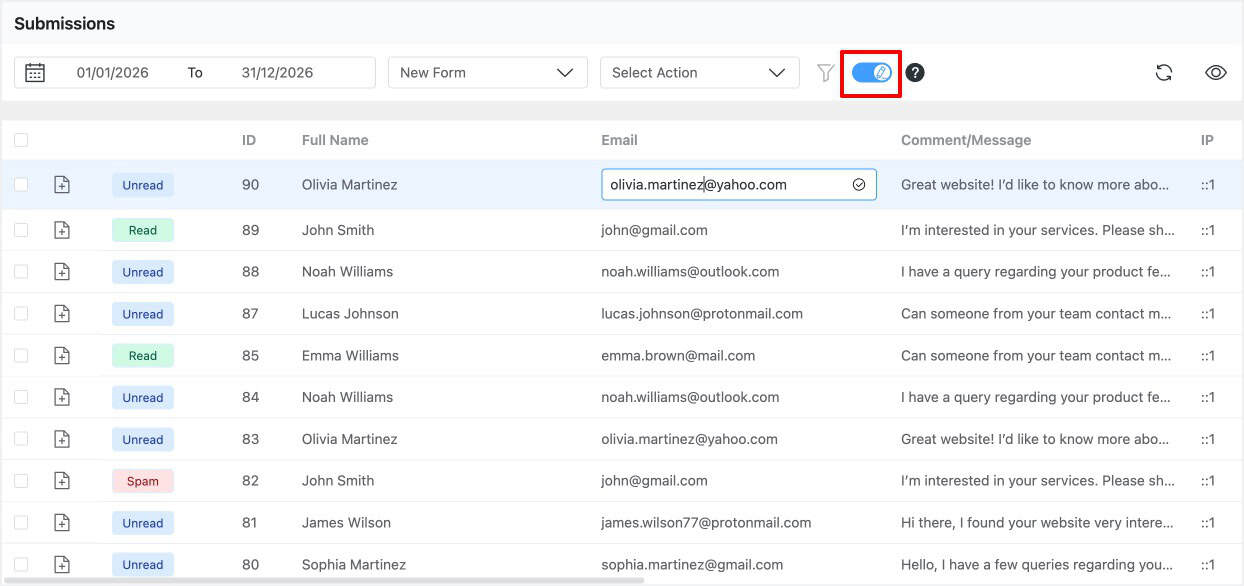
Pro: Inline submission editing is available with Form Vibes Pro. System-captured fields — IP address, submission date, page URL, and user agent cannot be edited as they are factual records of when and where the submission came from.
How Do You Export Elementor Form Submissions to CSV?
From Form Vibes > Submissions, select your Elementor form from the dropdown and click the Quick Export button in the toolbar. Form Vibes generates a CSV file immediately, every entry for the selected form, with all captured field values as columns. The file downloads and opens directly in Excel, Google Sheets, or any spreadsheet application.
There are two export approaches:
Quick Export downloads all entries for the selected form. Use this for full dataset backups, client reporting, or a complete data handoff.
Filtered Export lets you apply a date range, field value filter, or submission status filter first, then export only the matching subset. Use this for specific reporting windows for example, all Elementor form submissions received in April, or all entries where the “Service” field equals “Web Design”.
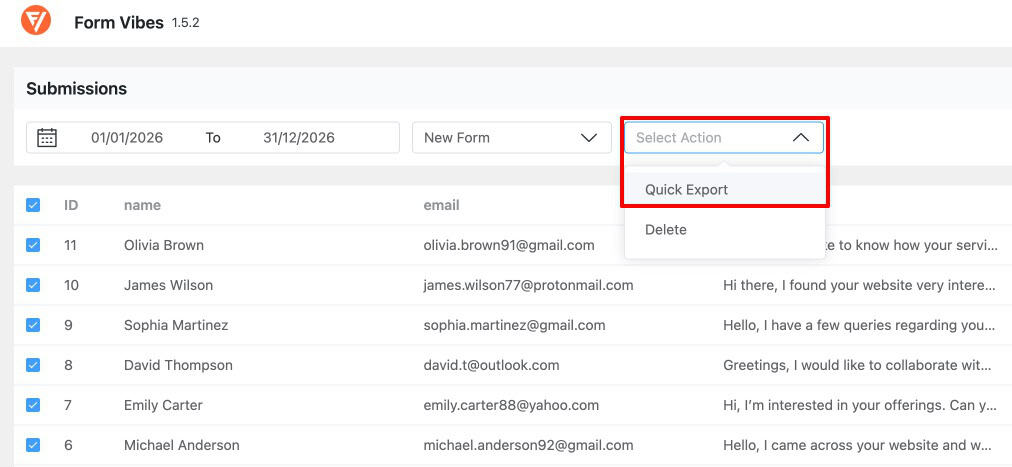
Notes: The free version of Form Vibes exports up to 1,000 entries per Quick Export. For larger datasets or saved reusable export configurations, Form Vibes Pro’s Export Profiles feature handles this with no entry limit. For automatic sync to Google Sheets on every new submission, that is also a Pro feature. See the complete guide on how to export WordPress form submissions with Form Vibes.
Elementor Native Submissions vs Form Vibes – Full Comparison
This table covers only the features where a difference exists between Elementor’s built-in panel and Form Vibes.
| Feature | Elementor | Form Vibes |
|---|---|---|
| Submission analytics and trend charts | No | Yes |
| WordPress admin dashboard widget | No | Yes |
| Event Log (full activity audit trail) | No | Yes |
| Cross-plugin unified dashboard | No | Yes |
| Edit submissions inline | No | Yes |
| Submission Notes | No | Yes |
| Advanced field-level filtering | No | Yes |
| Google Sheets sync | No | Yes |
| Role-based access manager | No | Yes |
Notes: Form Vibes and Elementor’s native submissions panel work side by side without conflict. You do not need to disable Elementor’s built-in storage to use Form Vibes — both capture independently from the same form submissions.
Conclusion
Elementor Pro stores your form submissions. Form Vibes makes that data work harder. You get analytics to track trends over time, an Event Log to audit every change, a unified dashboard for all your form plugins, and with Pro, the ability to edit entries, run team workflows, and sync automatically to Google Sheets.
Install Form Vibes from the WordPress plugin directory, activate it alongside Elementor Pro, and submit one test entry through your Elementor form. The gaps in Elementor’s native panel are filled from that moment.
Building Elementor forms from scratch? See the complete guide on how to configure an Elementor form to capture leads.

Manage Elementor Pro submissions Easily
Free to install. Works alongside Elementor Pro without replacing anything. Analytics, Event Log, unified dashboard, and team workflows – ready from the first submission.
Frequently Asked Questions
Common questions about saving and managing Elementor form submissions.
Does Elementor Pro save form submissions automatically?
Yes. Elementor Pro submissions captured from the Elementor Forms widget are saved automatically to the database and are viewable under Elementor > Submissions.
Does Form Vibes conflict with Elementor’s built-in submissions?
No. Form Vibes and Elementor’s native submissions panel operate independently. Both capture Elementor form submissions at the same time without interfering with each other. You do not need to disable Elementor’s built-in submission storage to use Form Vibes.
Can I edit an Elementor form submission after it is saved?
Not in Elementor’s native panel, field values are locked once an entry is submitted. Form Vibes Pro adds inline editing directly in the submissions table. You can click into any field cell, correct the value, and save without opening a separate edit page.
Can I export Elementor submissions to Google Sheets automatically?
Yes, with Form Vibes Pro. The Google Sheets integration connects your site to a Google Spreadsheet via OAuth and pushes each new Elementor submission to a selected sheet automatically, with form fields mapped to specific columns.
How do I see who deleted or changed an Elementor form submission?
Open the Event Log for all the entry. The Event Log records every action taken on the submission edits, status changes, notes added, and deletions with a timestamp.


Leave a Reply