How to Manage All Your WordPress Form Submissions in One Place
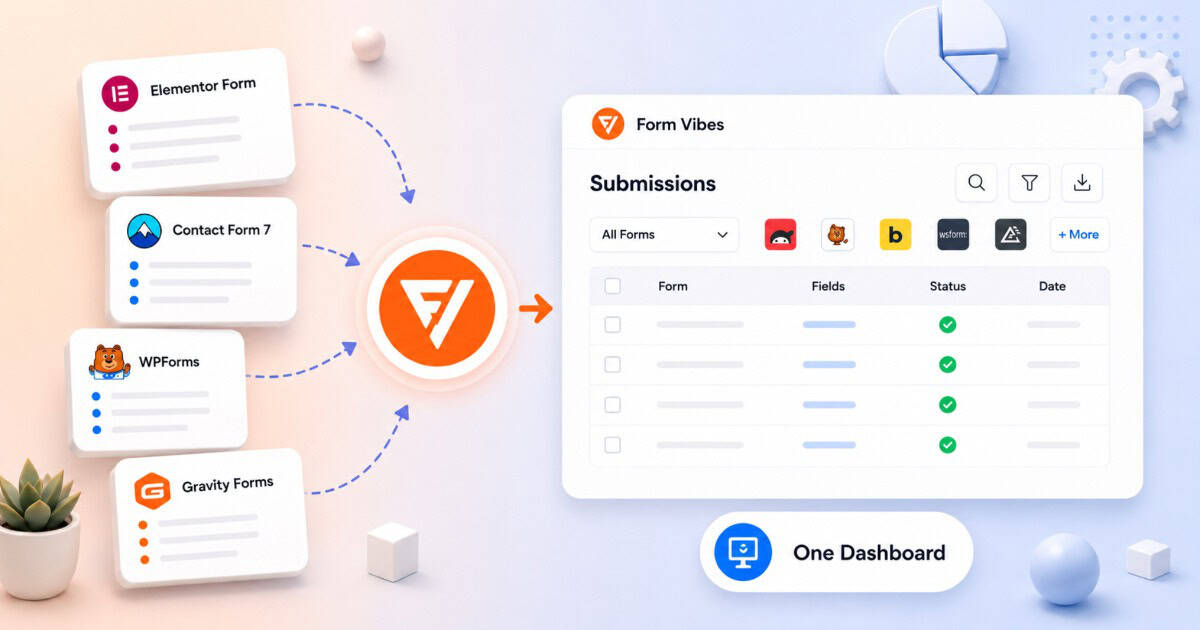
Most WordPress sites end up running more than one form plugin. Gravity Forms on the contact page, WPForms on a newsletter signup, Elementor on a landing page form. Each one chosen for a specific reason but each storing submissions in a completely separate place with a different interface and no connection between them.
Checking submissions means jumping between multiple dashboards. No single view, no consistent interface, no unified export across your forms.
Form Vibes fixes this. Install it once and it automatically captures submissions from every supported form plugin on your site into one unified dashboard – no per-plugin setup, no integrations to configure, nothing to map.
Why managing submissions gets messy with multiple form plugins
For most sites this happens gradually not all at once.
Different plugins for different purposes Gravity Forms for a complex multi-step contact form. WPForms for a newsletter signup. Elementor for a landing page. Each was chosen for a specific feature. Each stores submissions in its own separate dashboard with its own interface and export options.
Switching plugins but keeping old forms live A site migrates from Gravity Forms to WPForms but leaves older Gravity Forms active on existing pages. New submissions go into WPForms. Historical Gravity Forms submissions stay in their own database. No single view covers both.
Agency sites with inherited plugins An agency takes over a client site already running a form plugin they would not have chosen. They add their preferred plugin for new forms. Now two plugins are running simultaneously with submissions split between them.
Notes: If you are not sure where your current form submissions are actually being stored, read the guide on where WordPress form submissions actually go.
How Form Vibes unifies your form submissions
Install Form Vibes once and it starts capturing submissions from every supported form plugin active on your site automatically, from that point forward.
What Form Vibes supports: Contact Form 7, WPForms, Elementor, Gravity Forms, Ninja Forms, WS Form, Beaver Builder, Bricks Builder, and Formidable. Read the guide on how to save your Contact Form 7 submissions if you are just getting started with Form Vibes.
No per-plugin setup needed There are no integrations to toggle, no API keys to connect, and no forms to map individually. Form Vibes detects every supported plugin on your site and starts capturing immediately after activation.
One submissions dashboard for everything Go to Form Vibes → Submissions. Use the form dropdown to select a specific form. The interface is identical regardless of which plugin the form was built with.
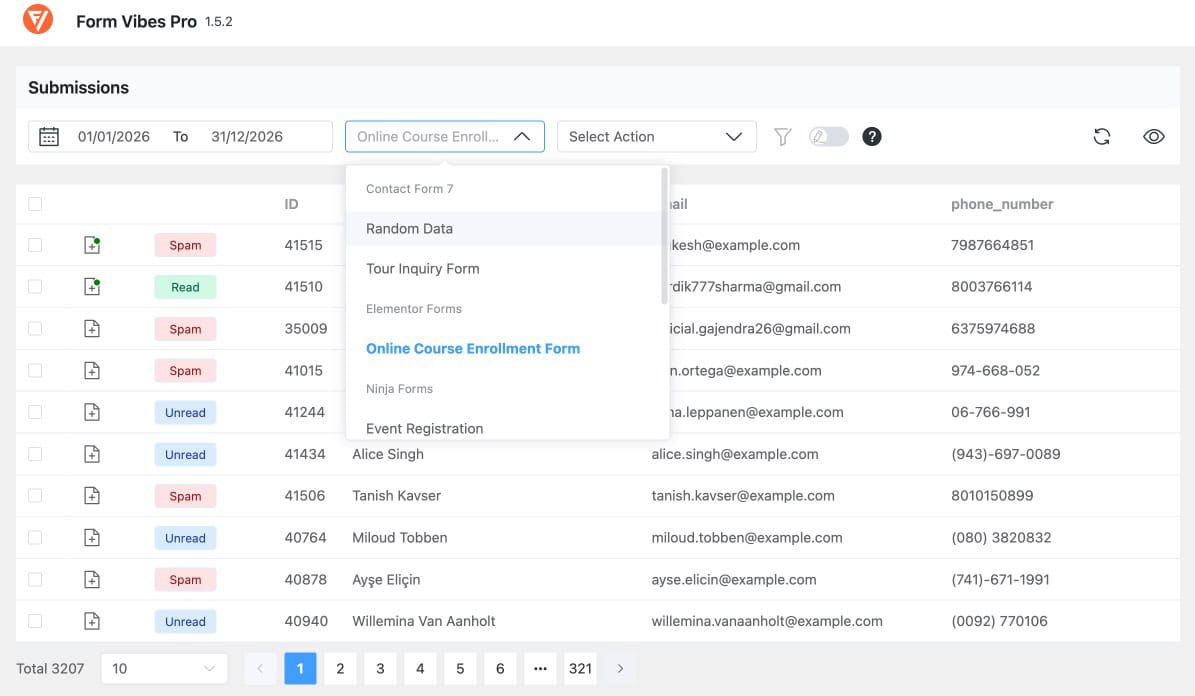
Important: Form Vibes captures submissions made after it is installed and activated. Submissions stored in your form plugin’s own database before Form Vibes was active are not retroactively imported. Everything from activation onwards is captured automatically.
Form Vibes captures submissions from WPForms, Elementor, Gravity Forms, Ninja Forms, and more automatically, in one dashboard. Free to install, no setup needed per plugin.
What you can do from the unified dashboard
Every Form Vibes feature works consistently across all your forms regardless of which plugin they were built with.
Search and filter
Search submissions by field value across any form. Filter by date range, submission status, or specific field conditions. The same filtering interface works whether you are looking at a WPForms submission or a Gravity Forms entry.
Show or hide columns
Control which columns appear in the submissions table. Toggle individual columns on or off to show only the fields relevant to you useful when a form has many fields and you only need to see a few at a glance.
Edit entries
Edit any field value in any submission directly from the Form Vibes dashboard. Every edit is recorded in the Event Log with the username and timestamp of who made the change.
Notes
Add internal notes to any submission, a follow-up reminder, a status update, a team comment. Notes work the same across all form plugins.
CSV export
Export submissions from any form to CSV. Apply date range and field filters before exporting to get exactly the data you need.
Three situations where a unified dashboard saves the most time
Multiple form plugins running at the same time
Your site has a Gravity Forms contact form, a WPForms newsletter signup, and an Elementor landing page form all active simultaneously. Without Form Vibes, checking submissions means visiting three separate plugin dashboards. With Form Vibes, all three appear in one dropdown. Switch between them in one click or view all submissions together in a single combined list.
You switched form plugins but kept old forms live
You migrated from Gravity Forms to WPForms but left the old Gravity Forms active on some pages. New submissions go into WPForms. Gravity Forms submissions stay in their own database. Form Vibes captures both from the moment it is installed, so your view going forward is unified even if the history is split between the two plugins.
Managing a client site with multiple inherited plugins
You take over a client site already running Gravity Forms. You add WPForms for a new page. Form Vibes captures both automatically. The client gets one clean view of all their enquiries regardless of which plugin each form was built with. See the guide on how to share form submissions with clients without a WordPress login for options on giving clients direct access.
Conclusion
Running multiple WordPress form plugins does not have to mean managing submissions in multiple places. Form Vibes captures everything into one dashboard automatically one interface, one export, one view, regardless of how many form plugins are active on your site.
If you want to understand how your forms are performing over time, the guide on tracking your WordPress form performance with Form Vibes covers the Analytics feature in full. And if you are ready to see what Form Vibes Pro adds on top of the unified dashboard, the Form Vibes Free vs Pro comparison covers every feature in full.

See All WordPress Form Submissions in One Place
Form Vibes captures submissions from WPForms, Elementor, Gravity Forms, and more – automatically, with no per-plugin setup needed.
Frequently Asked Questions
Common questions about managing all WordPress form submission from one place.
Does Form Vibes work with all WordPress form plugins?
Form Vibes captures submissions from Contact Form 7, WPForms, Elementor, Gravity Forms, Ninja Forms, WS Form, Beaver Builder, Bricks Builder, and Formidable. If you are using a form plugin not on this list, check the Form Vibes documentation for the current supported plugin list, it is updated as new integrations are added.
Do I need to configure Form Vibes separately for each form plugin?
No. Install and activate Form Vibes once and it automatically captures submissions from every supported plugin active on your site. No per-plugin setup, no integrations to toggle, no forms to map individually.
Can I see submissions from all my forms together in one dashboard?
Yes. Go to Form Vibes → Submissions and use the form dropdown. Select a specific form from the dropdown to filter down to just that form’s entries.
Does Form Vibes import submissions from my form plugins?
No. Form Vibes captures submissions made after it is installed and activated. Submissions stored in your form plugin’s own database before Form Vibes was active are not retroactively imported. From activation onwards everything is captured automatically.
Is the unified dashboard a free or Pro feature?
The unified dashboard is a free Form Vibes feature. Capturing submissions from all supported plugins, viewing them together, filtering, column visibility, and CSV export are all available on the free plan. See the Form Vibes Free vs Pro comparison for everything the Pro plan adds on top.




Leave a Reply